目次
使用 R Markdown #
常用的 GitHub Flavored Markdown 功能很少,熟悉之后可以使用更强大的 R Markdown。
R Markdown 的优势:
多用途
R Markdown 可以用来写文档,输出格式为 PDF、HTML、Word 等,写书可以用 bookdown。除了写文档,R Markdown 还可以用来写幻灯片(ioslides、Slidy、Beamer、Powerpoint、xaringan 等)和写博客(blogdown)。
可运行代码
R Markdown 中可以插入代码,编译文档后代码结果会在输出文档里面。这样的话,改了代码新的结果也会自动插入到输出文档,就不用自己手动插入图片了。
有序列表只有第 1 个数字有作用 #
下面的有序列表显示效果一样
| |
| |
| |
它们都会显示为
- 香蕉
- 葡萄
- 菠萝
另外,列表数字可以不以 1 为开头。比如
| |
会显示为
- 香蕉
- 葡萄
- 菠萝
在有序列表中使用同一个数字有两个好处:一是不需要自己手动编号、二是使用 Git 管理文件时变动更少。
图片 + 超链接 #
超链接的语法是[链接文本](链接网址),图片的语法是。把图片当成超链接的文本,放到超链接的语句中就可以生成带有超链接的图片,也就是[](链接网址)。
这是 GitHub 的吉祥物 Octocat


这是 Github 的链接
[GitHub](https://github.com/)
把它们拼凑起来就可以制作带有 GitHub 链接的 Octocat
[](https://github.com/)
如果点击上面的图片不会跳转到 GitHub,可能是因为本站使用了 PhotoSwipe 这样的相册插件。你可以把代码复制到 Markdown 编辑器试试看。
使用包含 ``` 的代码块 #
如果代码块里包含 N 个 `,在需要代码块前后使用 N+1 个 ` 把它包裹起来,不然就会显示错误。下面内容会显示为两个空代码块夹着 print("Hello, World!")。
| |
上面代码的正确写法应该是
| |
它会显示为
| |
用空行隔开不同元素 #
用空行隔开不同元素可以消除歧义,避免错误的显示效果。如果不用空行的话,可能会出现意料之外的显示效果。如果我用下面的写法列举我喜欢吃的食物,猜猜 Markdown 编辑器会如何显示。
| |
点击这里查看不同解析器的结果,有三种显示效果。



现在你应该知道不加空行的严重后果了。我们再来看看那个错误示范。
| |
它应该包含了 4 个元素:依次为段落、有序列表、段落、有序列表。在元素间加上空行显示就没问题了。点击这里查看效果,这次所有解析结果都正常。
| |
Typora 标题自动标号 #
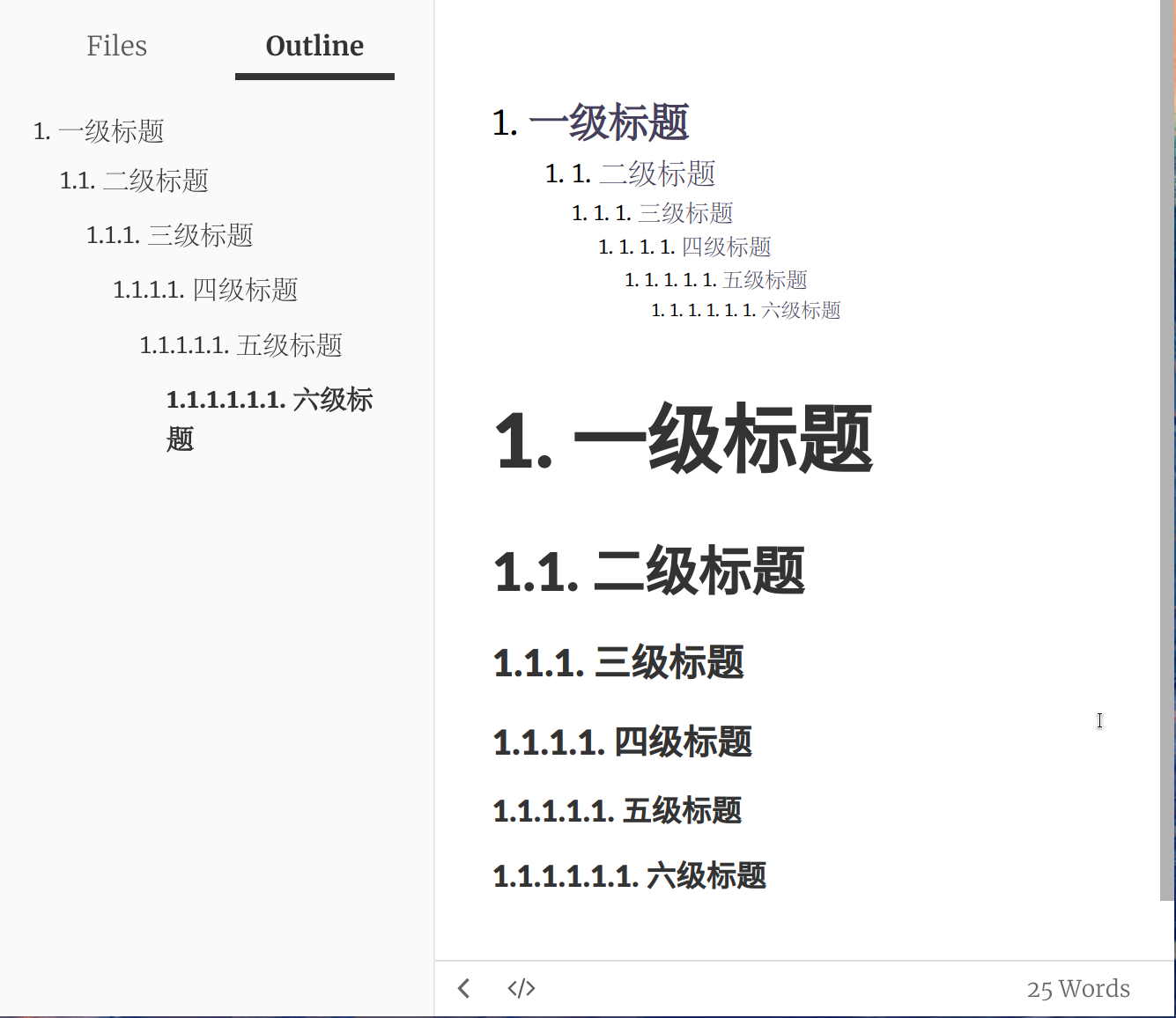
给 Typora 文章、目录和大纲的标题编号:
按下
Ctrl + ,打开 Typora 设置点击
Appearance -> Open Theme Folder来打开主题文件夹Linux 的路径为
~/.config/Typora/themesWindows 的路径为
%APPDATA%\Typora\themes新建一个名为
base.user.css的文件,把下面的代码粘贴进去(出处)1 2 3 4 5 6 7 8 9 10 11 12 13 14 15 16 17 18 19 20 21 22 23 24 25 26 27 28 29 30 31 32 33 34 35 36 37 38 39 40 41 42 43 44 45 46 47 48 49 50 51 52 53 54 55 56 57 58 59 60 61 62 63 64 65 66 67 68 69 70 71 72 73 74 75 76 77 78 79 80 81 82 83 84 85 86 87 88 89 90 91 92 93 94 95 96 97 98 99 100 101 102 103 104 105 106 107 108 109 110 111 112 113 114 115 116 117 118 119 120 121 122 123 124 125 126 127 128 129 130 131 132 133 134 135 136 137 138 139 140 141 142 143 144 145 146 147 148 149 150 151 152 153 154 155 156 157 158 159 160 161 162 163 164 165 166 167 168 169 170 171 172 173 174 175 176 177 178 179 180 181 182 183 184 185 186 187 188 189 190 191 192 193 194 195 196 197 198 199 200 201 202 203 204 205 206 207 208 209 210 211 212 213 214 215 216 217 218 219 220 221 222 223 224 225 226 227 228 229 230 231 232 233 234 235 236 237 238 239 240 241 242 243 244 245 246 247 248 249 250 251 252 253 254 255 256 257 258 259 260 261 262 263 264 265 266 267 268 269 270 271 272 273 274 275 276 277 278 279 280 281 282 283 284 285 286 287 288 289 290 291 292 293 294 295 296 297 298 299 300 301 302 303 304 305 306 307 308 309 310 311 312 313 314 315 316 317 318 319 320 321 322 323 324 325 326 327 328 329 330/************************************** * Header Counters in Article **************************************/ /** initialize css counter */ #write { counter-reset: h1 } h1 { counter-reset: h2 } h2 { counter-reset: h3 } h3 { counter-reset: h4 } h4 { counter-reset: h5 } h5 { counter-reset: h6 } /** put counter result into headings */ #write h1:before { counter-increment: h1; content: counter(h1) ". " } #write h2:before { counter-increment: h2; content: counter(h1) "." counter(h2) ". " } #write h3:before, h3.md-focus.md-heading:before /** override the default style for focused headings */ { counter-increment: h3; content: counter(h1) "." counter(h2) "." counter(h3) ". " } #write h4:before, h4.md-focus.md-heading:before { counter-increment: h4; content: counter(h1) "." counter(h2) "." counter(h3) "." counter(h4) ". " } #write h5:before, h5.md-focus.md-heading:before { counter-increment: h5; content: counter(h1) "." counter(h2) "." counter(h3) "." counter(h4) "." counter(h5) ". " } #write h6:before, h6.md-focus.md-heading:before { counter-increment: h6; content: counter(h1) "." counter(h2) "." counter(h3) "." counter(h4) "." counter(h5) "." counter(h6) ". " } /** override the default style for focused headings */ #write>h3.md-focus:before, #write>h4.md-focus:before, #write>h5.md-focus:before, #write>h6.md-focus:before, h3.md-focus:before, h4.md-focus:before, h5.md-focus:before, h6.md-focus:before { color: inherit; border: inherit; border-radius: inherit; position: inherit; left:initial; float: none; top:initial; font-size: inherit; padding-left: inherit; padding-right: inherit; vertical-align: inherit; font-weight: inherit; line-height: inherit; } /************************************** * Header Counters in TOC **************************************/ /* No link underlines in TOC */ .md-toc-inner { text-decoration: none; } .md-toc-content { counter-reset: h1toc } .md-toc-h1 { margin-left: 0; font-size: 1.5rem; counter-reset: h2toc } .md-toc-h2 { font-size: 1.1rem; margin-left: 2rem; counter-reset: h3toc } .md-toc-h3 { margin-left: 3rem; font-size: .9rem; counter-reset: h4toc } .md-toc-h4 { margin-left: 4rem; font-size: .85rem; counter-reset: h5toc } .md-toc-h5 { margin-left: 5rem; font-size: .8rem; counter-reset: h6toc } .md-toc-h6 { margin-left: 6rem; font-size: .75rem; } .md-toc-h1:before { color: black; counter-increment: h1toc; content: counter(h1toc) ". " } .md-toc-h1 .md-toc-inner { margin-left: 0; } .md-toc-h2:before { color: black; counter-increment: h2toc; content: counter(h1toc) ". " counter(h2toc) ". " } .md-toc-h2 .md-toc-inner { margin-left: 0; } .md-toc-h3:before { color: black; counter-increment: h3toc; content: counter(h1toc) ". " counter(h2toc) ". " counter(h3toc) ". " } .md-toc-h3 .md-toc-inner { margin-left: 0; } .md-toc-h4:before { color: black; counter-increment: h4toc; content: counter(h1toc) ". " counter(h2toc) ". " counter(h3toc) ". " counter(h4toc) ". " } .md-toc-h4 .md-toc-inner { margin-left: 0; } .md-toc-h5:before { color: black; counter-increment: h5toc; content: counter(h1toc) ". " counter(h2toc) ". " counter(h3toc) ". " counter(h4toc) ". " counter(h5toc) ". " } .md-toc-h5 .md-toc-inner { margin-left: 0; } .md-toc-h6:before { color: black; counter-increment: h6toc; content: counter(h1toc) ". " counter(h2toc) ". " counter(h3toc) ". " counter(h4toc) ". " counter(h5toc) ". " counter(h6toc) ". " } .md-toc-h6 .md-toc-inner { margin-left: 0; } /************************************** * Header Counters in Content **************************************/ /** initialize css counter */ #write { counter-reset: h1 } h1 { counter-reset: h2 } h2 { counter-reset: h3 } h3 { counter-reset: h4 } h4 { counter-reset: h5 } h5 { counter-reset: h6 } /** put counter result into headings */ #write h1:before { counter-increment: h1; content: counter(h1) ". " } #write h2:before { counter-increment: h2; content: counter(h1) "." counter(h2) ". " } #write h3:before, h3.md-focus.md-heading:before { /*override the default style for focused headings */ counter-increment: h3; content: counter(h1) "." counter(h2) "." counter(h3) ". " } #write h4:before, h4.md-focus.md-heading:before { counter-increment: h4; content: counter(h1) "." counter(h2) "." counter(h3) "." counter(h4) ". " } #write h5:before, h5.md-focus.md-heading:before { counter-increment: h5; content: counter(h1) "." counter(h2) "." counter(h3) "." counter(h4) "." counter(h5) ". " } #write h6:before, h6.md-focus.md-heading:before { counter-increment: h6; content: counter(h1) "." counter(h2) "." counter(h3) "." counter(h4) "." counter(h5) "." counter(h6) ". " } /** override the default style for focused headings */ #write>h3.md-focus:before, #write>h4.md-focus:before, #write>h5.md-focus:before, #write>h6.md-focus:before, h3.md-focus:before, h4.md-focus:before, h5.md-focus:before, h6.md-focus:before { color: inherit; border: inherit; border-radius: inherit; position: inherit; left: initial; float: none; top: initial; font-size: inherit; padding-left: inherit; padding-right: inherit; vertical-align: inherit; font-weight: inherit; line-height: inherit; } /************************************** * Header Counters in Sidebar **************************************/ .sidebar-content { counter-reset: h1 } .outline-h1 { counter-reset: h2 } .outline-h2 { counter-reset: h3 } .outline-h3 { counter-reset: h4 } .outline-h4 { counter-reset: h5 } .outline-h5 { counter-reset: h6 } .outline-h1>.outline-item>.outline-label:before { counter-increment: h1; content: counter(h1) ". " } .outline-h2>.outline-item>.outline-label:before { counter-increment: h2; content: counter(h1) "." counter(h2) ". " } .outline-h3>.outline-item>.outline-label:before { counter-increment: h3; content: counter(h1) "." counter(h2) "." counter(h3) ". " } .outline-h4>.outline-item>.outline-label:before { counter-increment: h4; content: counter(h1) "." counter(h2) "." counter(h3) "." counter(h4) ". " } .outline-h5>.outline-item>.outline-label:before { counter-increment: h5; content: counter(h1) "." counter(h2) "." counter(h3) "." counter(h4) "." counter(h5) ". " } .outline-h6>.outline-item>.outline-label:before { counter-increment: h6; content: counter(h1) "." counter(h2) "." counter(h3) "." counter(h4) "." counter(h5) "." counter(h6) ". " }保存文件并重启 Typora
为什么 Markdown 的标题叫 ATX 和 Setext #
Markdown 有两种标题写法,一种是 ATX 标题(ATX headings):
| |
另一种是 Setext 标题(Setext Headings):
| |
有很长一段时间,我都没法区分哪种标题是 ATX,哪种是 Setext。我特地用词典查 ATX 和 Setext,根本查不到释义。最近在谷歌和维基百科的帮助下,才发现原来这两个标题写法不是 Markdown 原创的,是出自 atx(the true structured text format) 和 Setext (Structure Enhanced Text)。
避免使用其他标记语言 #
Markdown 的格式有限,要使用 Markdown 不支持格式,就只能混用其他标记语言。但是混用标记语言可能会让你陷入追求格式的泥潭。举个例子,Markdown 不支持右对齐,要对文字右对齐只能使用 HTML 代码,比如 <div style="text-align: right">右对齐的文字</div>。这么做有两个问题,一是要输入长长的代码,二是转换成 HTML 以外的文档(如 PDF)右对齐代码就失效了。下面这个 Markdown 文件转换成 PDF 的话,右对齐会失效。
| |
春有百花秋有月,夏有凉风冬有雪。
若无闲事挂心头,便是人间好时节。
——无门慧开
其实在 R Markdown 中有让右对齐代码同时对 HTML 与 PDF 生效的方法(参考资料:9.6 Custom blocks (*) | R Markdown Cookbook)。
| |
在 R Markdown 中加载 LaTeX 宏包 #
| |
| |
| |
| |
| |
参考资料 #
- 6.4 Include additional LaTeX packages | R Markdown Cookbook
- knitr - How to include LaTeX package in R Markdown? - TeX - LaTeX Stack Exchange
giscus 评论。如果评论未加载,giscus 可能被你的互联网服务提供商屏蔽。